
Now in early access
Run every event production from one system
The all-in-one operating system for event production teams — budgeting, rundown and every department, in one place.
Plus a portal for every client, supplier, crew member, freelancer, showcaller and guest you work with — included at every plan, however many you invite.
30 days · up to 3 projects · no credit card
Rather look around first? See the live demo — a real production, no account, nothing to sign up for.
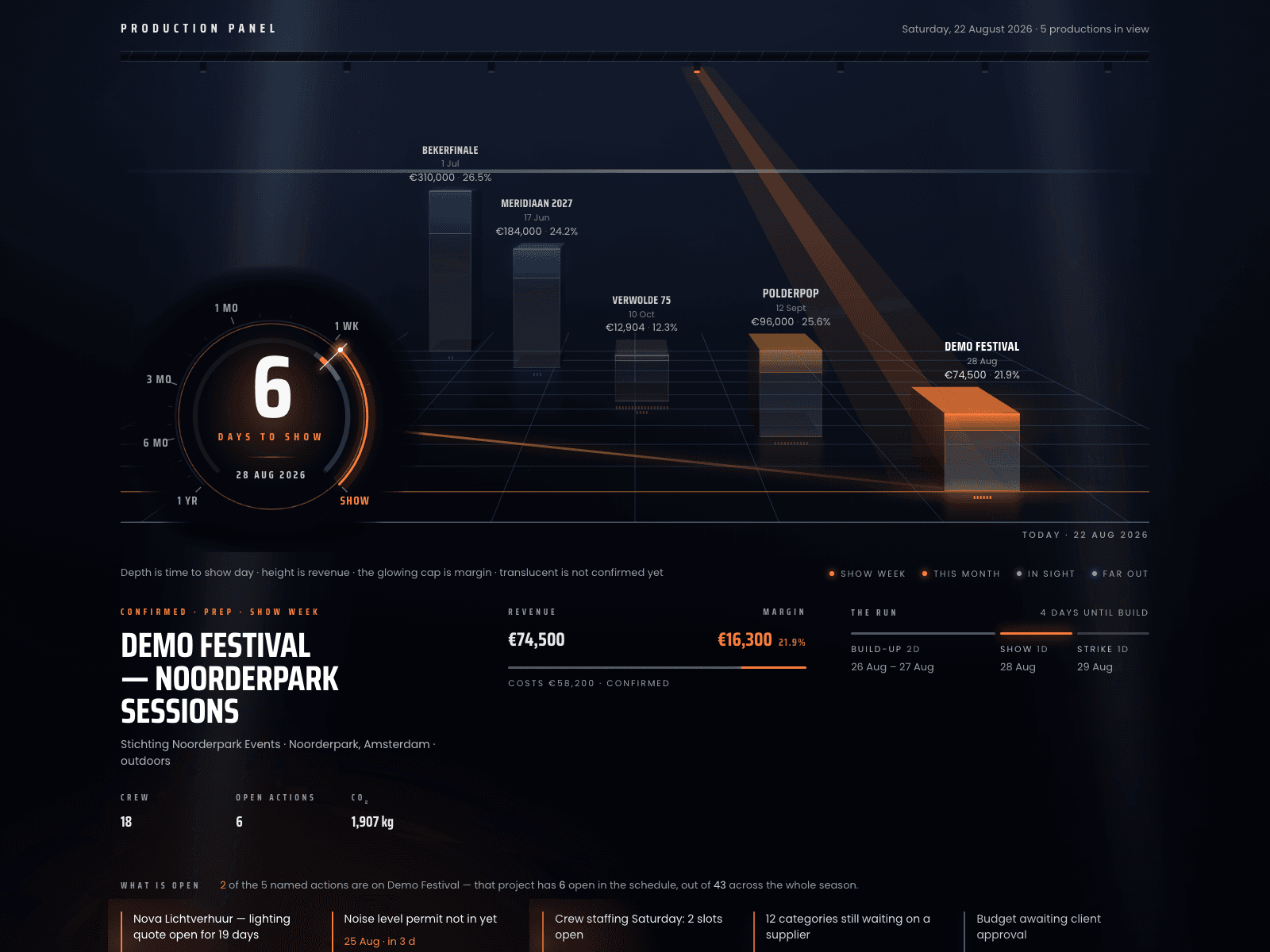
This is the first thing you see
Day one
You don't start with an empty database
The hardest evening with any new production tool is the first one, when there is nothing in it yet and every screen asks you to type. So the first thing you get is a finished event to take apart.
- 01Open the sample productionOne click builds a whole festival — two stages, a budget with quotes and live margin, a rundown, a rider, crew, catering, guests. It is a normal project: break it, throw it away.
- 02Bring your own lists inA material list from CSV, Excel or a drawing export. A supplier catalogue from CSV. A supplier's PDF quote, matched and split across your categories.
- 03Make it yoursSet your logo and colour once and every portal and every export carries it. Invite your team; each person picks English or Dutch.
Instead of a folder full of sheets
The spreadsheets you can close
Every list below lives in the same production as the budget, so changing a supplier in one place changes the rider, the callsheet and the invoice with it.
One production
- 01The budgetCost, margin and client price on every line, running against the client's budget as you type, and out as a quote or an invoice PDF.
- 02The equipment listImported from CSV, Excel or a drawing export, matched against your catalogues, and checked against your own stock for those dates.
- 03The warehouse listAvailability per period, a QR label per asset, check-out and check-in by scan, pick lists, packing notes and inspection flags.
- 04Crew planningPositions per day and per stage, with travel, hotel and flights hanging off the person — and double bookings as conflicts, not as a colour.
- 05The hours sheetDay rate, overtime and per diem, with the hours built from the check-in and check-out stamps of the badge scan.
- 06The callsheetBuilt from the crew, venue, schedule and contacts already in the project, so there is no second copy to go stale.
- 07The run of showA schedule per stage and per day for the build, plus a live rundown with cues per department for the show itself.
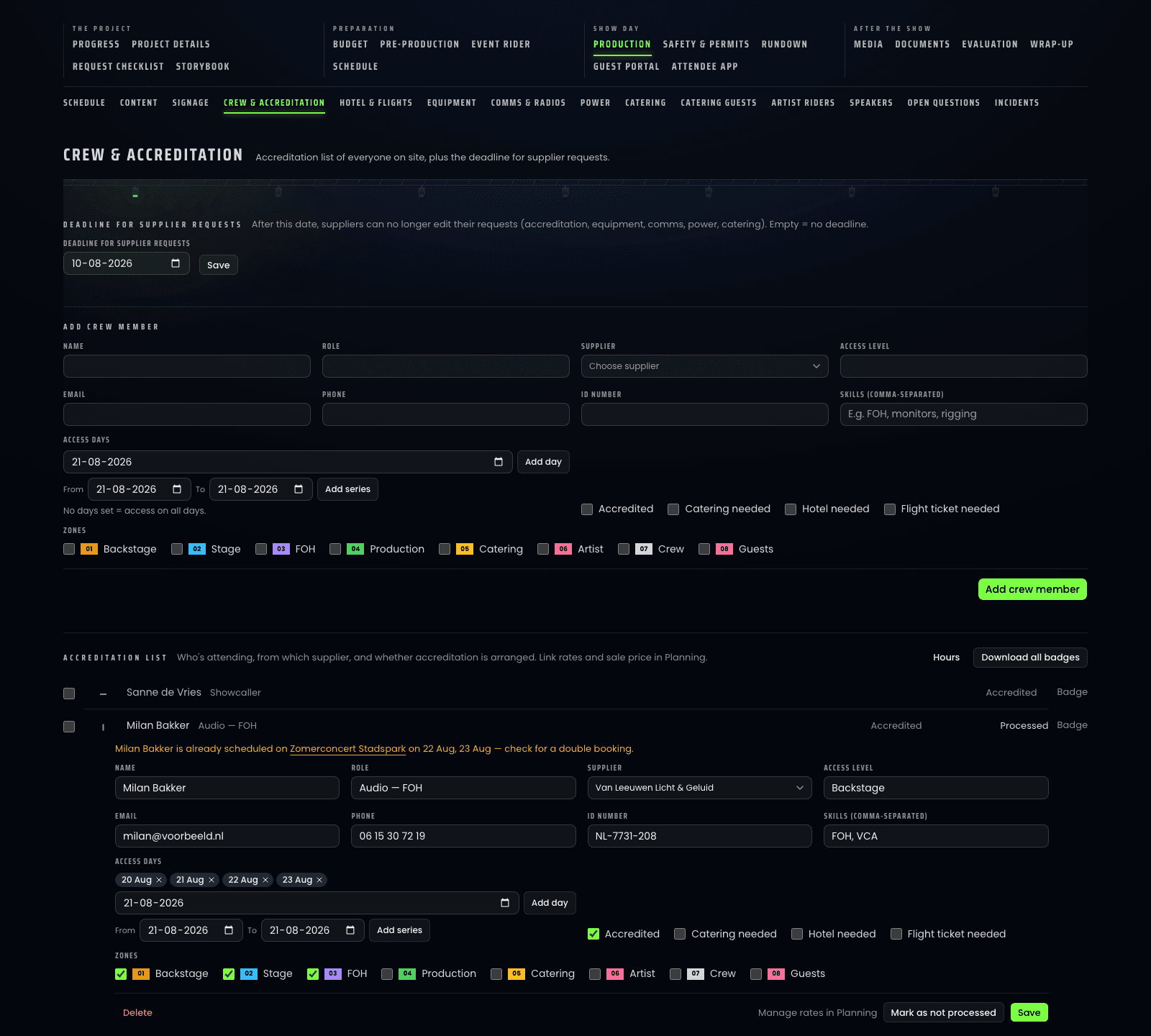
- 08The accreditation listOne printable A6 pass per person for the whole event — access days and numbered zones on the front, zone legend and production phone numbers on the back — filled in by your suppliers before your deadline and scanned at the gate to stamp people in and out.
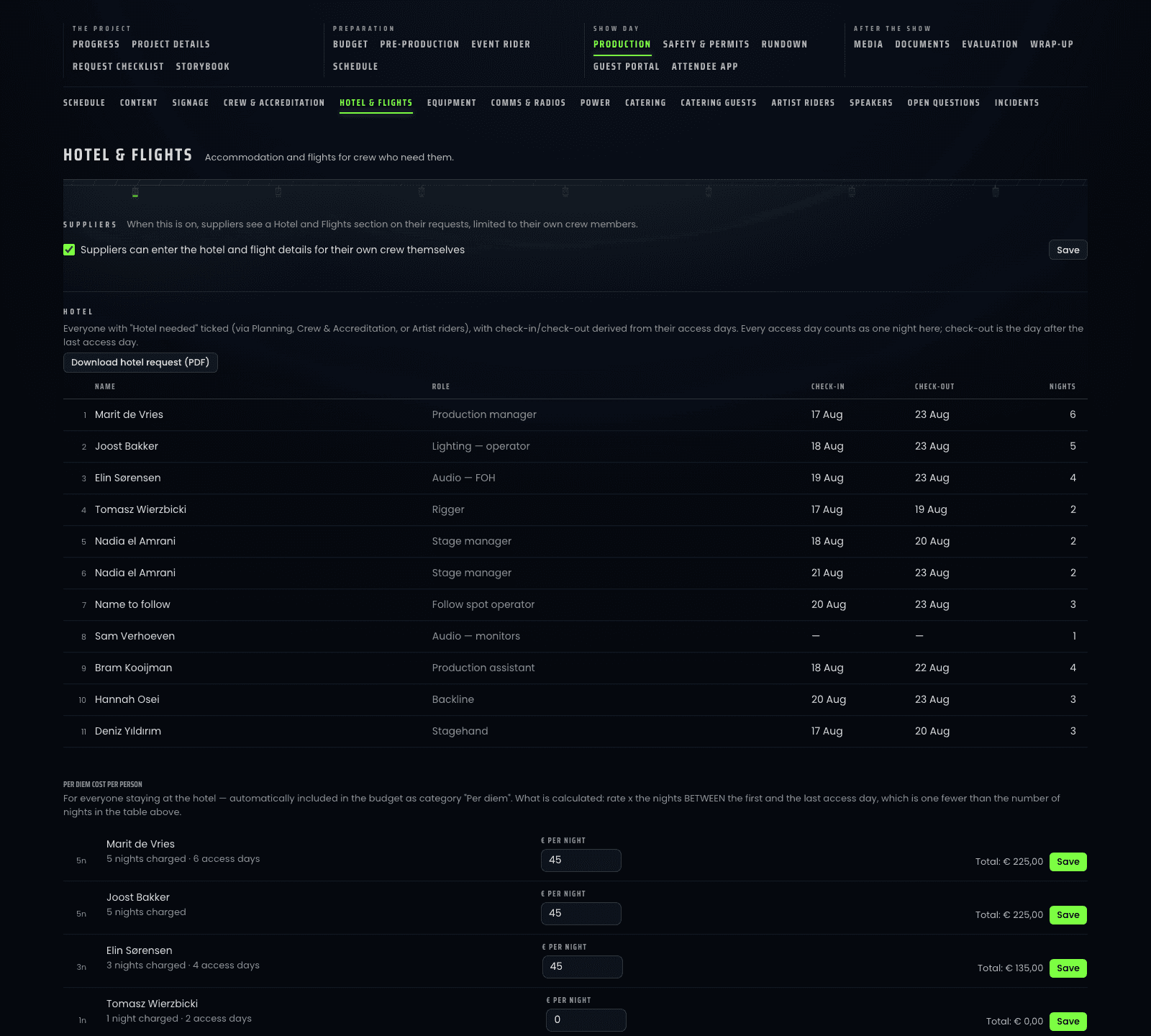
- 09Hotel & flightsTick "needs a hotel" on a crew line and that person lands on the rooming list with check-in, check-out and nights already worked out from their access days — out as a request PDF, with the per-night rate running into the budget and the booking reference showing up in that person's own portal.
- 10The catering listMeal counts per day and per area, typed in by your subcontractors themselves and by your guests in their RSVP, with cutlery, cups and drinks on their own list with a return date — and out as one PDF for the caterer.
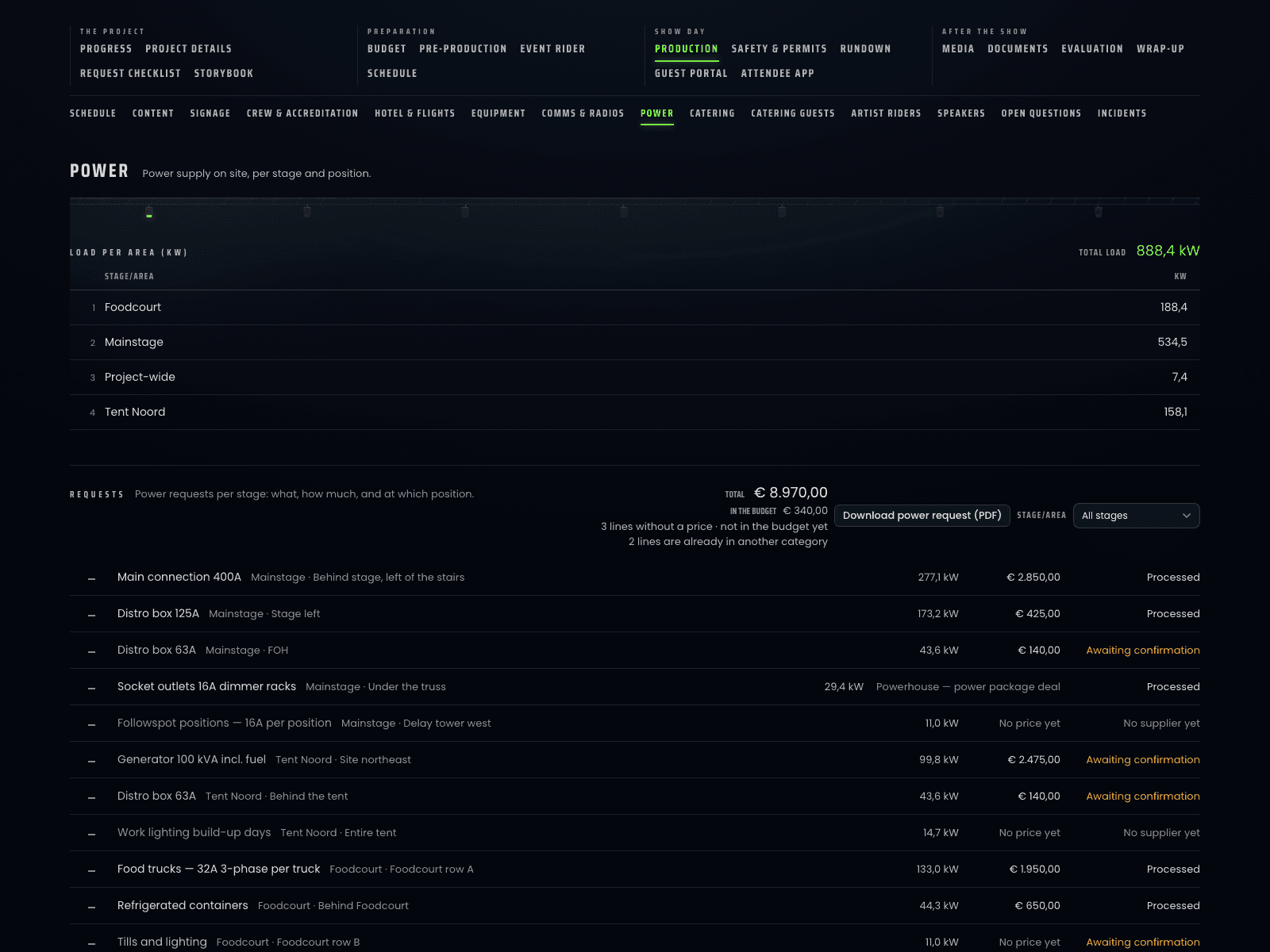
- 11Power & loadEvery power drop per stage with its amps and phase, the kW load per area adding itself up as you type, and the whole request out as a PDF the power company can quote from.
- 12Comms & radiosEvery belt pack and radio on a named person with its channels, area and supplier, priced per device into the comms budget and out as a PDF hand-out list — and the rental company adds its own rows from its portal.
- 13The sign planEvery sign on the site as one line — type, how many, where it hangs and who prints it — with one click moving it from to order to ordered to placed, and the whole plan out as a PDF the build crew walks the site with.
- 14Artist riders & speakersRider in or not per artist, their travelling crew straight into accreditation and the rooming list, and every speaker with a headshot and a one-line note, printed four to a page as the face book the crew holds at the stage door.
- 15The CO₂ sheetCalculated from what is already in the project, with the emission factor behind every line and its source named on the page.
- 16The risk assessmentRisks with likelihood, effect and control measure, and the permit application that goes with them.
- 17The tender trackerTenders and leads by stage, with weighted forecast value, win rate, and the deadlines that are about to pass.
Three of those lists, as they actually look
Accreditation
Hotel & flights
Catering
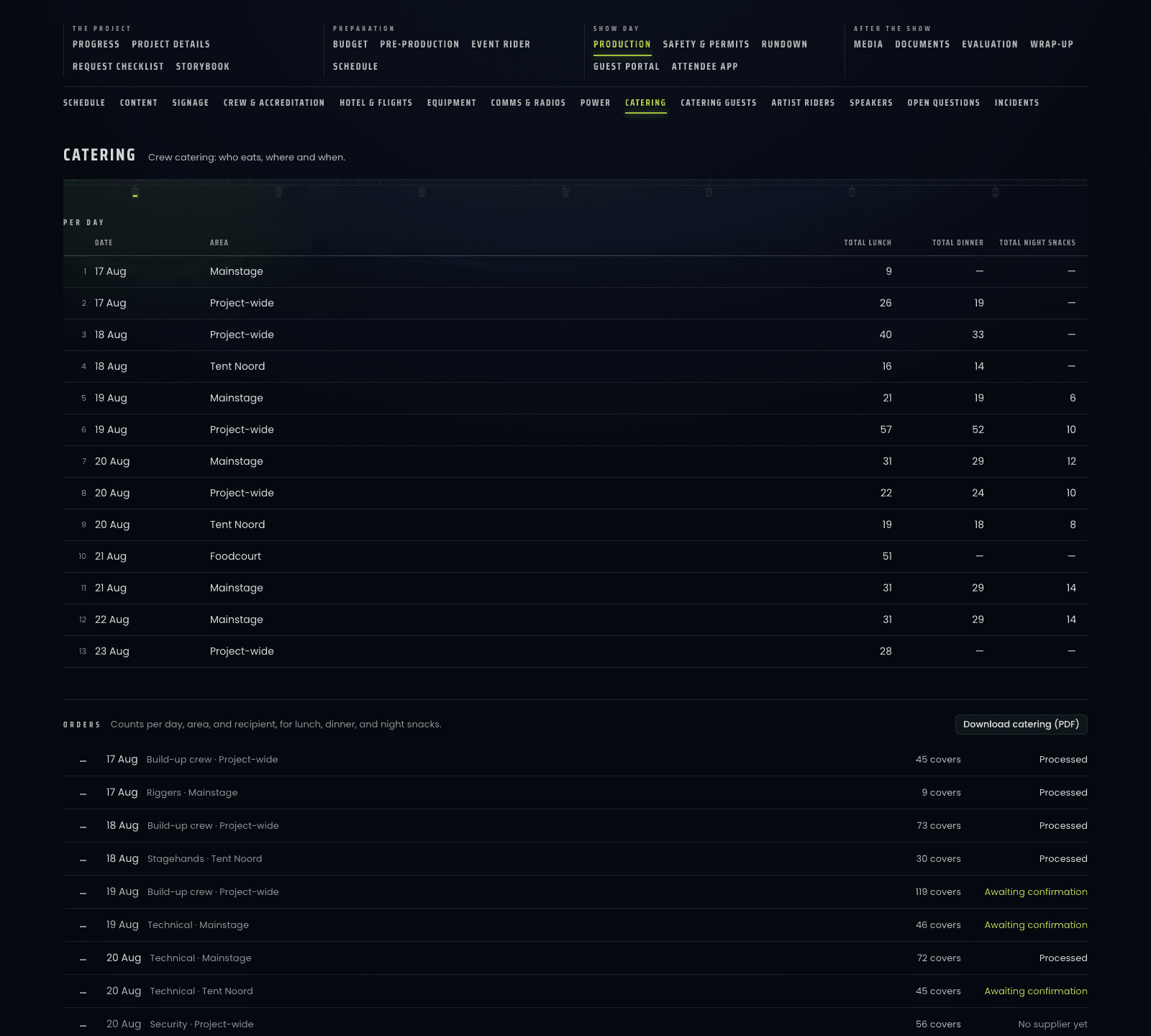
All of it exports as PDFs on your own logo and colour, and combines into one production book. Moving a real production in takes an evening, not a quarter.
The budget
Every line tells you how hard its number is
A budget where you cannot see whether an amount is a signed quote or a guess is the thing this was built to fix. Four sources sit behind every category, and the screen shows which one is winning.
The budget
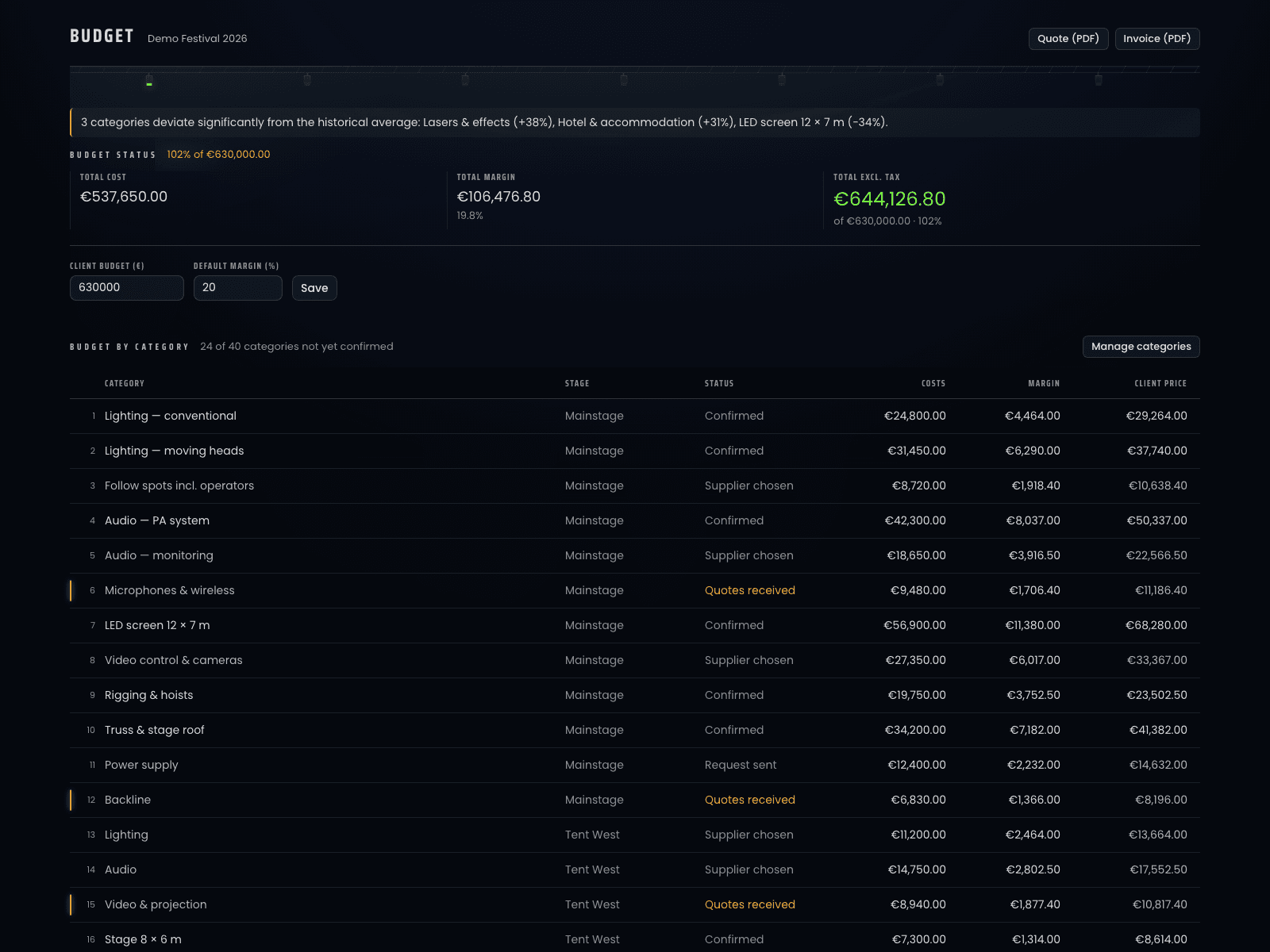
- Manual amount€ 13,000Used
- Chosen quote€ 12,400Overruled · Halogen Rental
- Material request€ 12,180Doesn't count · 2 of 9 lines have no price yet
- Provisional sum€ 11,000
The four sources, in the order they win
- 01A manual amountThe number you actually work with. It beats even a signed quote — that is where your buffer goes — and it erases nothing.
- 02A chosen quoteA real amount from a real supplier for exactly this scope, and the only one anybody put their name to.
- 03The material request, added upCatalogue prices times quantities times the rental scale. It counts only once every line has a price.
- 04A provisional sumWhat you type when you have nothing yet. It stays at the bottom, and it stays visible.
Nothing is ever overwritten, only outranked — and the amount your client sees is worked out from the same four sources in the database, so their total and yours cannot drift apart.
How a chosen quote gets there
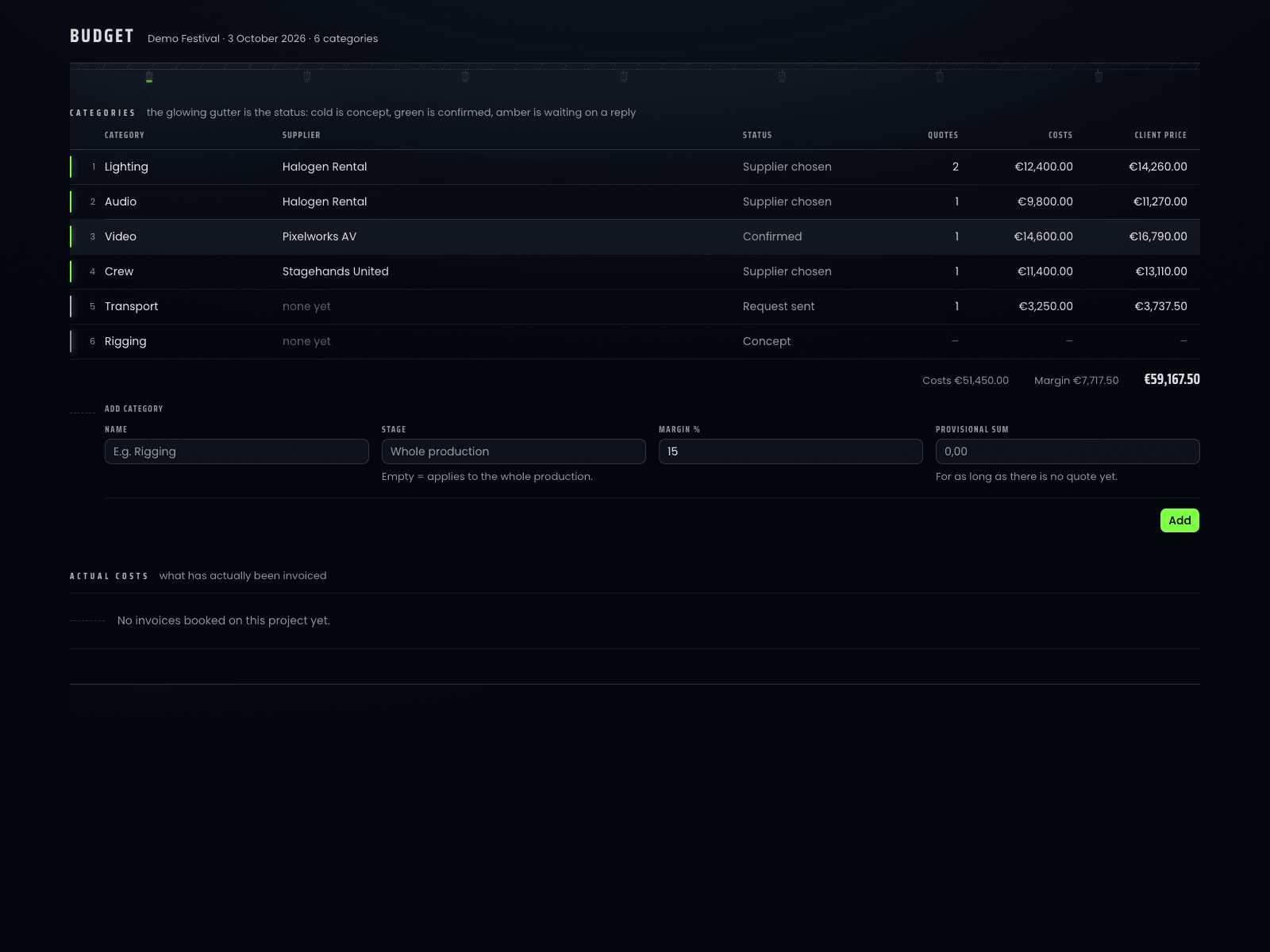
- 01One request, many categoriesTick the categories, pick the supplier, and one request covers all of them — as a portal link, not an attachment.
- 02Their PDF comes back as linesThe priced lines are read out of it, matched against your catalogue and split across the categories they belong to.
- 03Priced against your own historyA quote is set against the median of what you paid for that category before, so one outlier festival cannot move the norm.
- 04The supplier can push backFrom their portal they add the line you forgot to ask for; it lands as a proposal with their name on it until you accept it.
Show day
One rundown, every department, live
The screens the crew reads in a dark room get no atmosphere layer: what matters there is telling people what to do, from a metre away, without a legend.
The showcaller
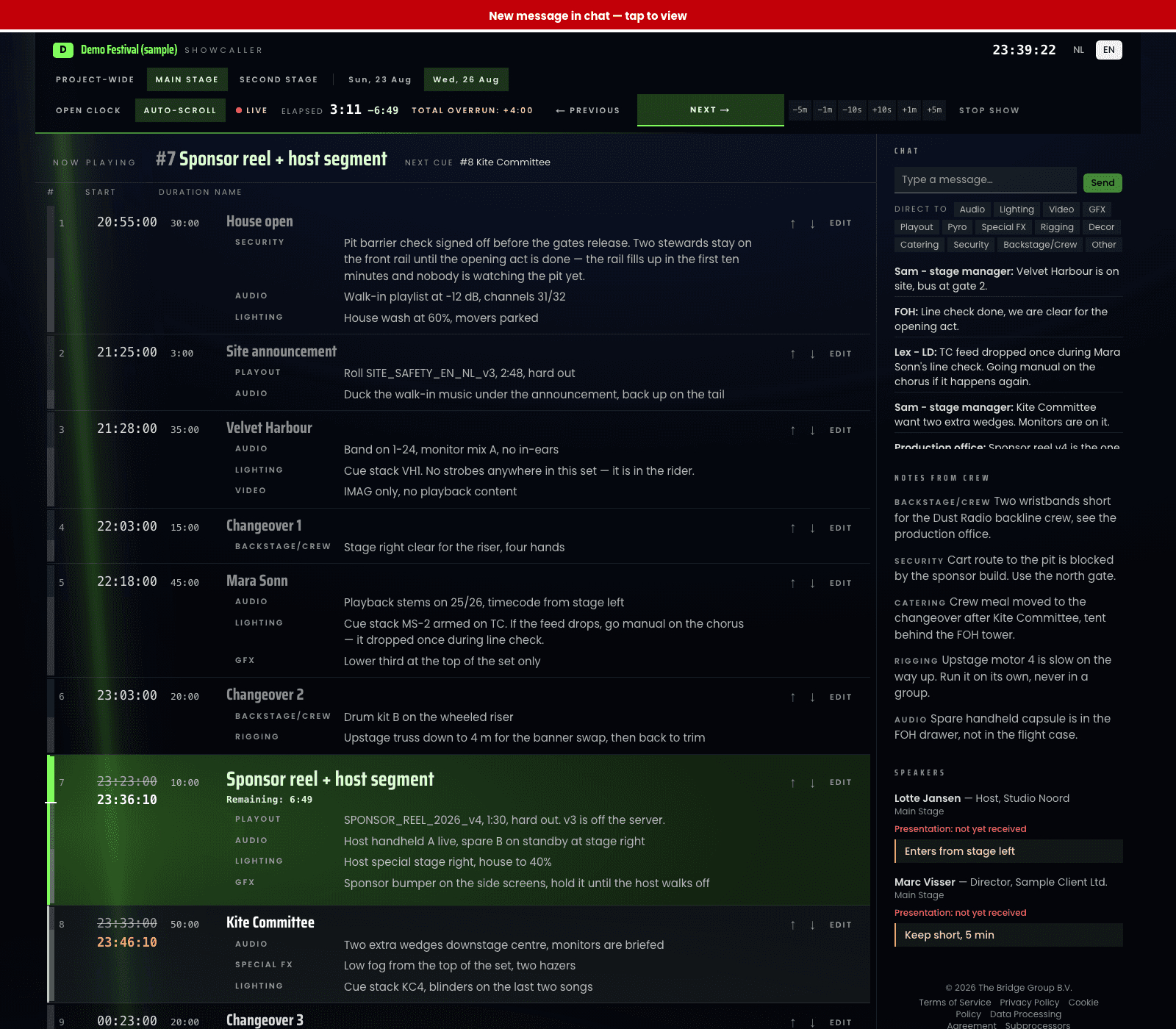
What the crew sees
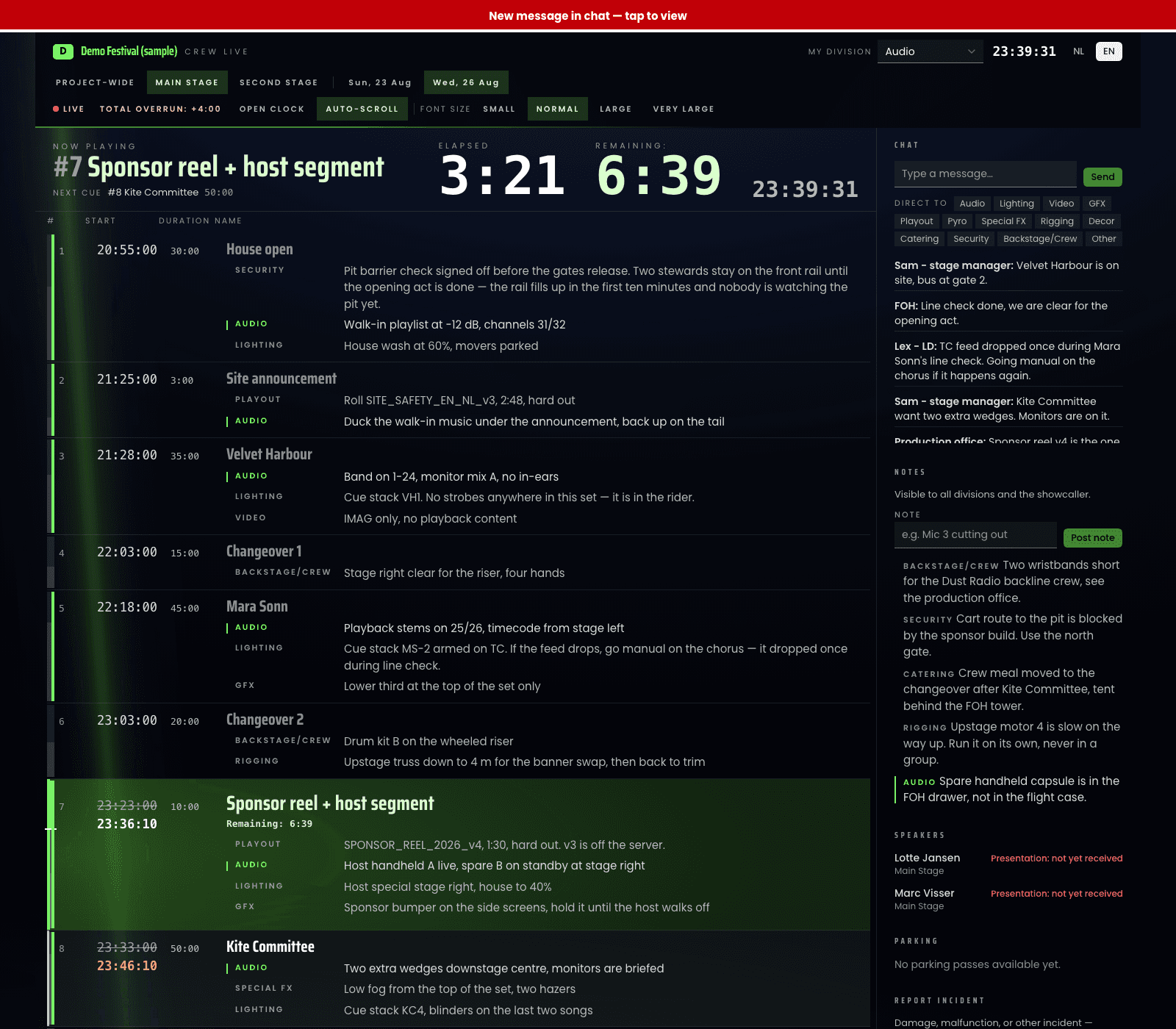
A cut you make at the desk is on every connected screen within seconds — showcaller, stage, front of house, the client — and the countdown clock goes red and stays red when you run over.
AI
The model only ever hands you a draft
No chat window bolted onto the side. Every use below sits on a screen you were already looking at, works from data already in the production, and gives back a draft you edit before it counts.
- 01An assistant inside the projectIt answers from this project's own data, and can write back three things — an open question, a meeting note, a schedule line — and tells you which.In a project
- 02The same assistant across the seasonOn the dashboard it reads every active production at once. Deliberately read-only: across projects, writing into the wrong one is not a risk worth taking.Dashboard
- 03Purchasing adviceIt sets the open and chosen quotes against what you paid before and names where money is on the table.Budget
- 04A first run of showA chronological draft for your dates and event type, validated line by line on the server, and only ever on an empty schedule.Schedule
- 05A first risk assessmentThe same for risks, on fixed categories and only on an empty list — a draft for someone qualified to react to, and the screen says so.Risk & permits
- 06The wrap-up in two paragraphsBudget versus actuals, attendance, CO₂, incidents and equipment damage become the summary that goes into the wrap-up PDF.Wrap-up
- 07The import lines nothing matchedThey get a proposed category — or, when the description is genuinely too vague, a short question back instead of a wrong guess.Imports
One login for every role
Everyone on the project gets exactly what they need
Invite anyone into their own portal — included at every plan, however many you need, and carrying your logo and your colour rather than ours.
What your client sees
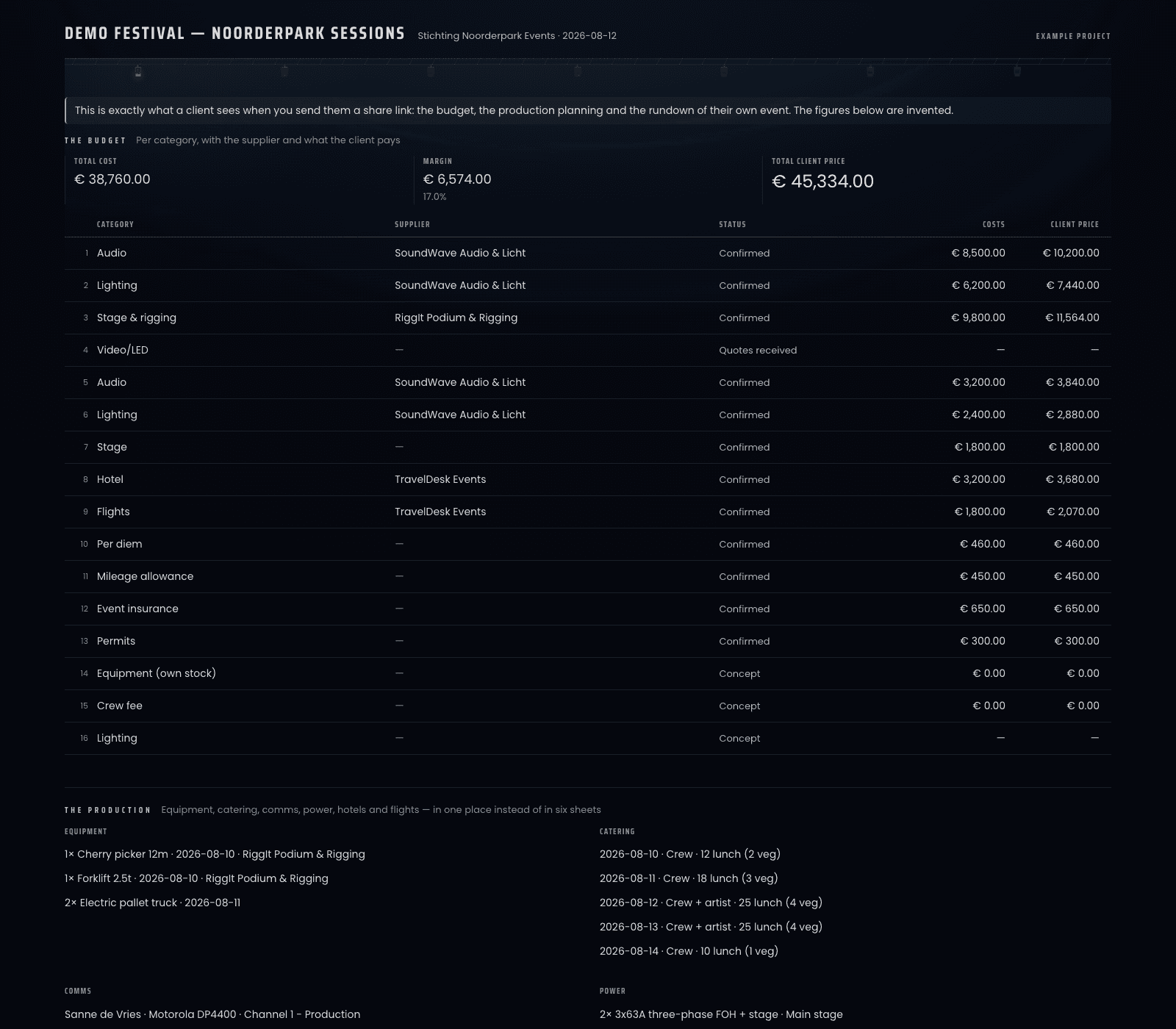
- CLClient portalFollow the budget, rider and schedule, approve quotes and invoices, and upload documents — no email threads.Log in →
- CRCrew portalThe live rundown and your call times for every show you're on, with notes per department.Log in →
- SUSupplier portalSee what's requested per category, upload your quote as a PDF, and track what's still open.Log in →
- FRFreelancer portalOne login for your schedule across every project you're booked on — not just one event at a time.Log in →
- SHShowcaller portalRun the show: edit the rundown live, cue every department, and keep the countdown clock in sync.Log in →
- GUGuest portalRSVP, find your table, and get the documents you need for the event you're invited to.Log in →
FAQ
Good to know
Are the screens on this page real?
Yes — this product rendered by its own components, with sample data from a demo festival. No mockups, no perspective renders, no customer data. They are in English here because this page is; the interface switches per user, and the question about running everything in Dutch is answered further down.
Is there a free trial?
Yes — 30 days with up to 3 projects and every module unlocked, no credit card. When it ends, everything you built stays visible and exportable; you just can't start new projects until you pick a plan.
How does pricing work?
Per person, not per event: €69 for the first user and €34.50 for every user after, Excl. VAT. A user is someone on your own team; every portal is free. Every plan includes unlimited projects.
Do our clients and suppliers need their own subscription?
No. Client, supplier, crew, freelancer, showcaller and guest portals are all included at every tier — invite as many as the event needs.
What if we don't want the AI features?
Then don't press the buttons. Nothing writes to your project on its own, and the two drafting tools only ever fill a list that was empty.
Can we run the whole platform in Dutch?
Yes — every screen and every portal switches instantly between English and Dutch, per user, at any time.
Who can see our data, and where does it live?
One database in the EU region, with row-level security on every table: a query that falls outside your own organisation returns no rows rather than an error. The whole answer — where the data sits, who can reach it, what is logged, and what happens when you leave — is on the security and privacy page, with the place in the code next to every claim, plus the data processing agreement and the subprocessor register. No ISO 27001 and no SOC 2 — that page says so as well.
What does 'early access' mean for us?
Everything on this page is built and working today — there are no roadmap items on it. What early access means is that the queue behind it is short and still open: if something your production needs isn't there, saying so is genuinely the fastest way to get it built.
Doors
Ready to run your next event on ProductionOS?
Start a free 3-project trial with the sample festival already in it, or see what a plan costs for the size of your team.
Already have an account? Log in
Built on years of live-event production experience from The Bridge Group B.V.